
CASE STUDY: Mobile Food Delivery App
Project overview


Product
Foodelli is a food delivery app designed to help people with disabilities order food from restaurants easier, faster, and on target. Its target audience is anyone between ages 25-60 who uses food delivery services due to a busy schedule.

Problem
People with disability face the challenge of getting their delivery package in a place where it’s hard for them to reach it.

Goal
Foodelli delivery app’s design includes a new feature not implemented in any of the food delivery apps on the market today.

My role
UX designer designing a food delivery app (aka Foodelli) from conception to delivery.

Responsibilities
Conducting interviews, creating wireframes, delivering low and high-fidelity prototyping, conducting usability studies, taking into consideration accessibility, making several rounds of design iterations.
User Research
Summary
As an essential part of this project, I conducted moderated and non-moderated interviews and created an empathy map. I actually wasn’t able to moderate interviews with people with disability, but I was deeply moved by my online research findings stating that there were some reported cases when a driver dropped off a delivery food in a location that wasn’t accessible for the customer. Therefore, enhancing the Instruction for a Driver’s section of the app was my priority.
Participants of my research were excited to see my multi-lingual section solution to solve the problem since they were immigrants or first-generation of Americans who see a value in that enhancement. In a cultural melt pot such as Chicago drivers are mostly service workers with LEP, therefore my intention was to see the problem from a different angle.
Pain points
Accessibility
Ordering food apps are not designed to work with assistive technologies.
Lacking customer service
The customers do not always receive their food delivery in a requested location.
Content
Hard to find new restaurants without doing time-consuming online research
Personas


User journey map
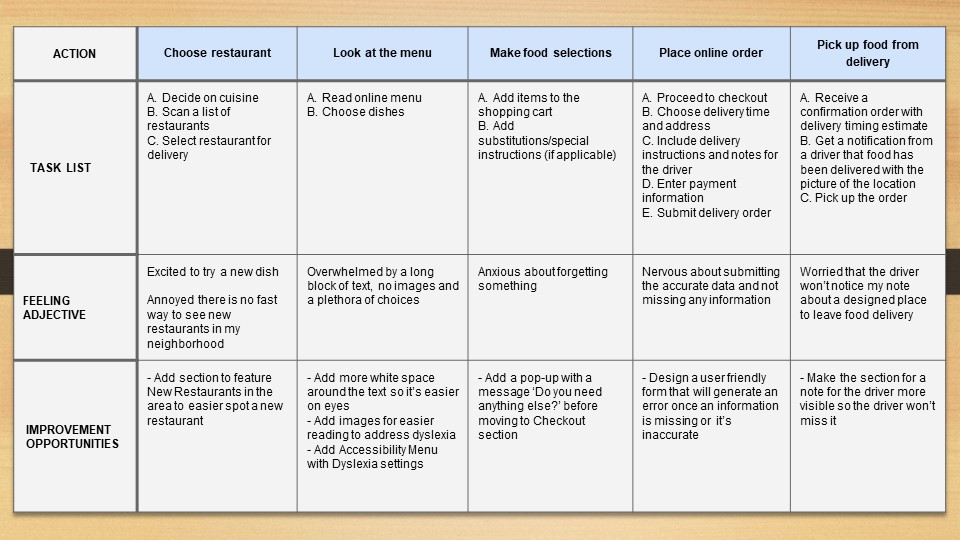
Robert’s user journey map indicates that there is a need for people with disabilities to address their concerns and make the online delivery experience better and more satisfying for them.
Design
Paper wireframes
After making a few iterations of the homepage on the paper wireframes, I chose the version that would be the best suitable for using VoiceOver functionality and the one that includes Popular/New Restaurants in the area to take into consideration user pain points.
The stars on the paper wireframes represent parts chosen for digital wireframes.

Digital wireframes

Low-fidelity prototype
The low-fidelity prototype in Figma, I created based on the digital wireframes, demonstrates a flow process for ordering food in the app (specifically Zuppa di Mare and Cobb salad from Calos Ristorante). This primary user flow was used in my usability study.

Usability study
Parameters:
- Study type: Unmoderated and moderated usability study
- Location: United States (moderate) and Argentina (remote)
- Participants: 5
- Length: 20-30 minutes
I conducted two rounds of usability studies. First one shortly after creating low-fidelity prototypes and the second after building high-fidelity prototypes.
- Round 1 findings

Users need to find the dish they are looking for in Search Field.
- Round 2 findings
The design needs more refinement to have a modern look & feel.
-

Users need to see that the items were added to the shopping cart in order to ensure that the app works properly and the ordering process is transparent.
-
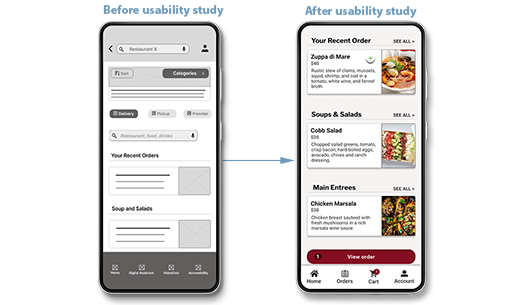
The design was overwhelming.
Too many items on the page, not even spacing between them.
It’s hard to figure out what to do because of that. -

Users don’t need an extra step in the ordering process when they click ‘Checkout’ button and get the “Forgot Anything?” page.


Mockups
High-fidelity prototype
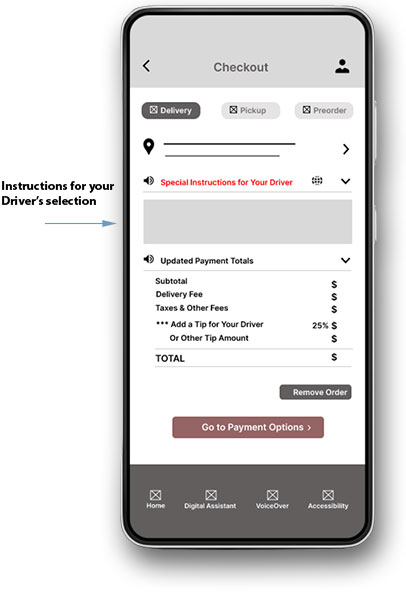
The final high-fidelity prototype includes the enhancement to the Instructions for Your Driver section available at the flow #1 (type the letter ‘p’ to view the flow, I used my native Polish language for the demonstration).

Design System
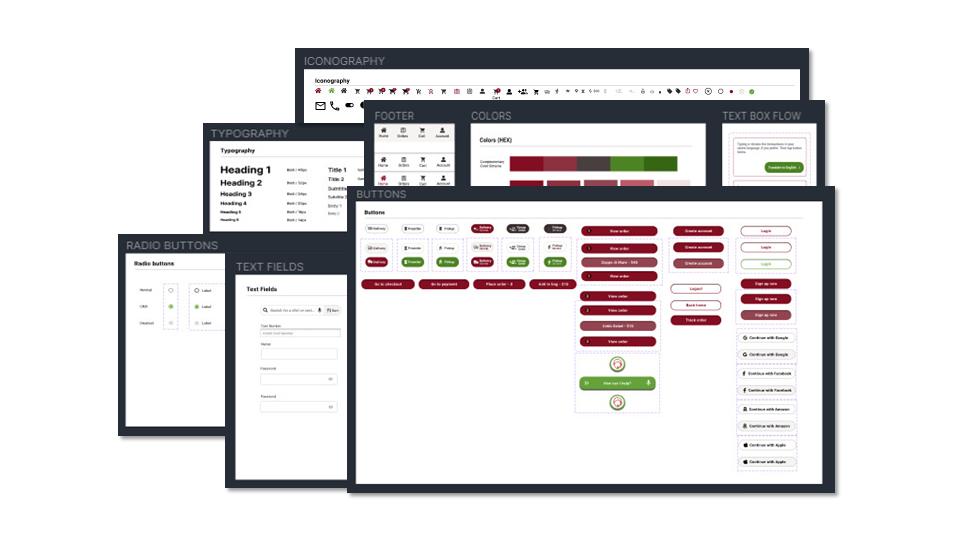
I have created this design system to play a role similar to a master stylesheet for easier and faster global iterations.
Accessibility
-
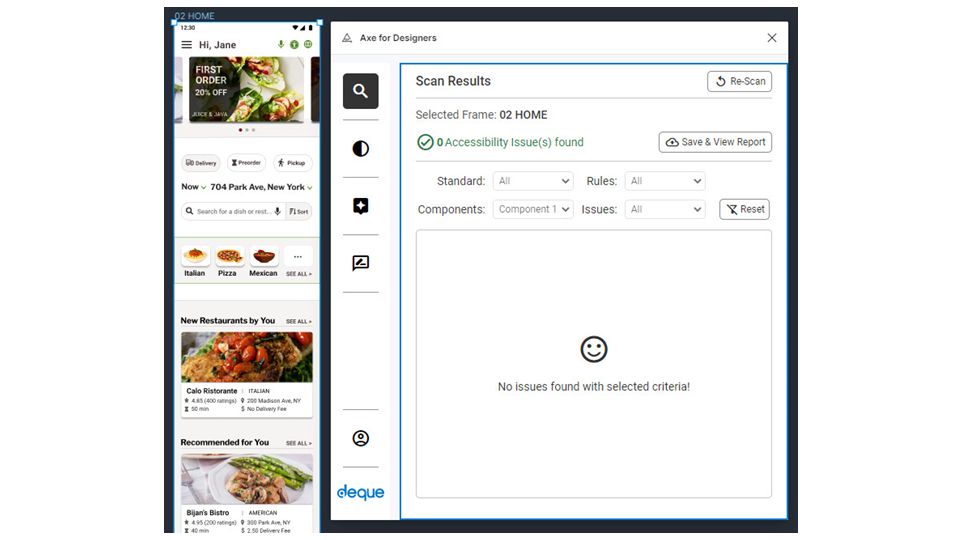
Implemented heading hierarchy for screen reader users to understand the page structure.
-
Chose a color palette that complies with 4.5:1 contrast requirement to meet the AA standards. Added imagery for dishes and alt text.
Conclusion
Takeaways
-

Impact
The app prioritizes the needs of people with disability and addresses users with LEP (Limited English Proficiency), which is quite a unique approach. -

What I learned
Designing an app is an evolving process that requires a lot of collaboration with numerous parties with a grand mission to make improvements and solve problems to help people.


 Beata Risner